A server is one game instance, running on one node, from one Game Spec. The spec decides how it installs, launches, configures and backs up; you decide where it lands, how much memory it reserves, and what its settings say.
Deploying
Pick a spec, pick a node or let the scheduler pick, name it, deploy.
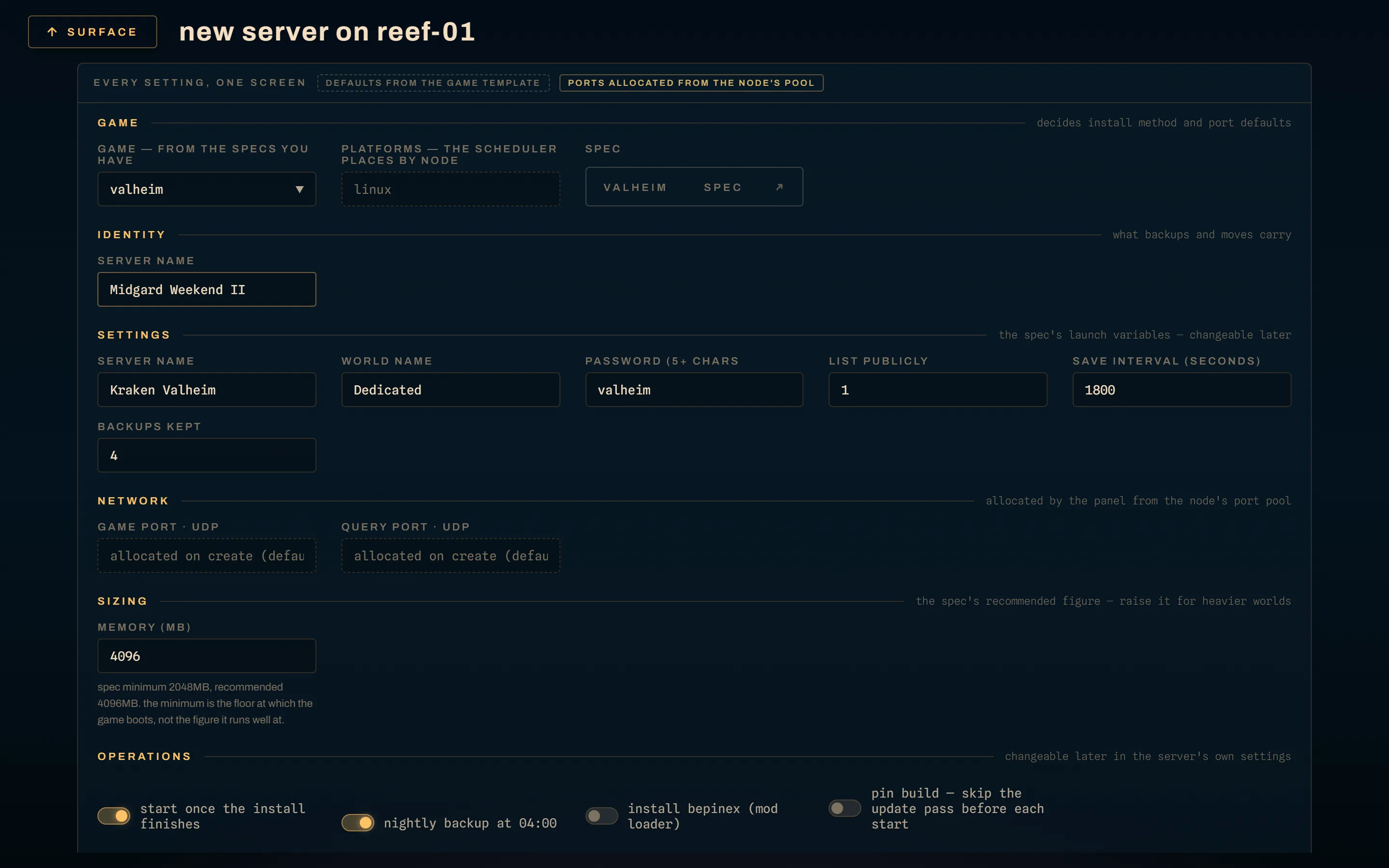
What the dialog is asking:
- Memory. Leave it blank to take the spec's own figure, which is its
recommended memory falling back to its minimum. An explicit value has to be at
least the spec's
min_memory_mb; under that floor the game does not boot, so the Panel refuses rather than letting you find out at start time. - Node. Optional. Pinning still goes through the scheduler, which checks
eligibility and reserves the ports. An ineligible pin comes back as a
409naming the reason, never as a quiet placement somewhere else. - Install BepInEx. Shown only when the spec declares
bepinex_compatible, and honoured only then. See Mods. - Pin build. Pins the server to the build this install pulls. Off by default; the section below is what it opts out of.
- Steam Guard code. Only for specs whose install needs an authenticated Steam login. Used for that one install and never persisted.
Ports come from the node's pool, 1:1 with the host. Deploying is asynchronous:
the server goes to installing and the install log streams into the console
pane while SteamCMD works.
The ten states
| state | what is true |
|---|---|
installing |
the install script is running on the node |
install_failed |
the install script failed; last_error says why; start is refused until a reinstall |
offline |
installed and stopped, nothing holding the data directory |
starting |
the container is up, the readiness line has not appeared |
running |
the game is serving |
stopping |
a graceful stop is in progress |
crashed |
the process exited unexpectedly; the exit code is kept |
restoring |
a backup restore is swapping save files on the node; start is refused until it ends (Backups) |
retiring |
a retire is stopping the server, taking its final backup and removing it; everything that would change it waits (below) |
retired |
on no node: its containers and world are gone, its record, settings, schedules and backups are kept (below) |
Four power actions drive it: start, stop, restart and kill. kill is
the one that does not ask the game nicely, and a world that saves on shutdown
will not have.
install_failed, offline and crashed are the stopped states, and they are
the three a reinstall accepts, because nothing holds the data directory in any
of them.
Update on start
Since 0.50.0, every operator-initiated start or restart re-runs the spec's
install script before launching. For a SteamCMD title that is an
app_update … validate pass, which is how a server picks up a game update at
all. Before this, a healthy server stayed on the build SteamCMD pulled the day
it was created, and the only way forward was delete and recreate.
The sequence, once you press start and the pass runs:
- The Panel stops the container if anything is holding the data directory, and the Agent confirms the container is really down before reporting the stop done.
- The Agent checks nothing else still has the data directory: an exited
container bound to it is removed, and a running one refuses the pass by
name, since SteamCMD writing under a live game corrupts the tree. Only the
stop has happened at that point, so a refusal leaves the server
offline, notinstall_failed, with the container named inlast_error. Until the pass ends the Agent also refuses any start or restart of the server, the crash watchdog's included; stop and kill still work. - It runs the install script. The server reads
installing, the response is a202carryingupdating: true, and the install log streams to the console. A start that skips the pass (the opt-outs and the paths below) is the plain synchronous200instead. - It re-renders the config files over the fresh tree. After the update, not before, because the pass can restore a file the depot owns and your settings have to win.
- It starts the game.
Where a failed pass leaves the server depends on how far it got, because the phases say different things about the install tree:
| phase that failed | where the server lands |
|---|---|
| the stop before the update (or reaching the Agent at all) | back where it was — running if it was running — with last_error set. Nothing on the node was touched, so there is nothing to reinstall; press start again once the node is back. |
| the Agent's check that nothing holds the data directory | offline — the stop before it ran, nothing else did — with the container that holds it named in last_error. Stop that container, then start again. A reinstall refused the same way stays in the stopped state it started from. |
| the install script | install_failed with last_error set. Start is refused until you reinstall — a half-written tree must not be launched over. |
| the start after a good install | offline. The tree is fine, the game did not come up, and a plain start retries it. |
The Panel also refuses the whole action up front when it has no live connection
to the node's Agent: a power action against an offline node answers 503 naming
the node, and the server's state is left alone. Before that, a restart aimed at
an unreachable node could mark a server install_failed over a stop that never
left the Panel, while the game went on serving players.
If a node's Agent reconnects and the Panel's row still disagrees, the reconciler
adopts what the Agent reports: a managed container found running behind an
offline or install_failed row moves that row to running and clears the
stale error.
The two opt-outs
- Per server: pin build. The Config tab's toggle. A pinned server never runs the pass on start, and reinstall becomes its explicit "update now". An ordinary settings save cannot unpin a server by omission; the field has to be sent deliberately.
- Per spec:
skip_update_on_start. The spec installs at create time and on an explicit reinstall only. It is also available per platform, for a spec whose install is idempotent on one platform and not the other, and a platform can only opt out, never opt a spec-wide opt-out back in. No bundled spec sets it. Setting it costs that game its updates, so I would treat it as a last resort rather than a convenience, and rewrite the script instead.
What deliberately does not update
Four paths start a server without re-running anything, and each is a decision rather than an omission.
- Any start within 30 minutes of an install. A create or reinstall that
succeeds stamps the server's
provisioned_at, and every start or restart inside that window skips the pass, which would only repeat an install that just ran. Starting does not clear the stamp, so a second start in the window skips it too. It covers the deploy form's "start once the install finishes" and an operator who stops to fill in settings first. It is a window rather than a "never started" flag so that a server created and left for days still updates on its first start. Editing a launch variable clears the stamp, because the install script may render it, even when the edit lands while the install is still running. A failed install clears it too. The settings response'snext_start_updatessays which way the next start will go. - Scheduled restarts. A cron restart drives the Agent directly. A nightly
restart is not an invitation to validate a 30 GB tree nightly. It runs on a
server that is
running,startingorcrashed, so it still revives a server the watchdog gave up on. It is skipped on anofflineone, because the Agent's restart is a stop then a start and would start a server someone had stopped, and onstopping,installingandinstall_failed. It is also refused while a required setting is empty. Any skip is recorded as the schedule's last error, shown on its row. - The crash watchdog's restarts. The Agent restarts the container itself and never involves the Panel, so a crash loop cannot become a download loop.
- A spec that needs a Steam login on a node with no stored credentials. The pass would fail on the login, so it is skipped with a warning in the Panel log and the server starts on the build it has. Store the node's Steam credentials, or use reinstall with a Steam Guard code.
Reinstall as "update now"
POST /servers/{id}/reinstall, or the action in the UI, re-runs the install
script once, immediately. It is both the retry for a failed install and the
explicit update for a server whose start does not update it.
It is accepted from install_failed, offline and crashed, and refused from
installing, starting, running and stopping with a 409 that names the
current state, and from restoring with a 409 carrying code: server_restoring. It runs asynchronously, exactly like the create path: the server
flips to installing and the log streams.
Unlike the update-on-start pass, a reinstall does re-run the spec's BepInEx overlay for a server deployed with it.
The install log
The install runs on the node and is streamed to the Panel, which buffers it in memory. There is no container left to tail once the phase ends, so the buffer is the record.
- It keeps the last 500 lines of the current attempt.
- It is kept after the install finishes, success included, because an installer can exit 0 having produced a broken tree.
- It is dropped when the server is retired or deleted, and replaced when the next install starts.
- It does not survive a Panel restart. The API answers
retained: falsewhen nothing is held, which is not the same as an install that printed nothing, and the UI says which it is rather than showing you an empty pane.
Reading a crash
When a server lands in crashed, the Agent captures the container's exit code
and the Panel keeps it until the next power action. The drill-in renders it as
exit <n> / 0xXXXXXXXX, and for the codes that come up repeatedly it adds what
they mean:
| code | what it usually is |
|---|---|
0xC0000135 |
a DLL the game needs is missing from the container image |
0xC0000139 |
a DLL is present but the wrong build; an export is missing |
0xC0000005 |
access violation; the game crashed on a bad memory access |
0xC000007B |
bad image format, a 32/64-bit mismatch between the game and a DLL |
Exit 0 is called out as the process ending on its own without an error code,
which on a game server is more often a startup argument the game rejected than a
clean shutdown. A code between 129 and 164 is reported as the signal that killed
it, code minus 128, so 137 reads as signal 9.
Whether the watchdog restarts after a crash is the spec's
startup.restart.on_crash, with its own retry ceiling.
Settings that wait for a restart
Two kinds of value, two different answers.
Launch variables are baked into the start command and the container environment when the container is created, so they are never live. A change takes effect on the next start, always.
Settings render into the game's own config files, which are written to the
bind-mounted data directory the moment you save. Whether the running game
notices is the game's business, and the spec declares it: settings.hot_reload
says the game re-reads its config while running. It changes nothing about what
gets pushed to the node, only what the Panel tells you afterwards.
The save response says which case you are in, so the UI can ask for a restart only when one is actually needed: a running server, plus either a changed launch variable or a settings change on a spec that does not hot-reload.
There is no per-setting "requires restart" flag. If you author specs, that is worth knowing before you go looking for one.
Retiring a server
Servers come back far more often than they go for good, so the button in the
drill-in's danger block retires the server. It is behind the typed
confirmation — type retire — and the confirmation says what happens in order:
the server is stopped, a final backup is taken, then its world and config are
removed from the node; its backups are kept, and it can be revived later from
any of them.
A retire, POST /servers/{id}/retire, runs in the background:
- Stop. A server that may be running is stopped, so the backup does not archive a world mid-save.
- Final backup. On by default (
final_backup: falseskips it). The Panel waits for the archive to be ready, for at most 30 minutes. - Removal. The node removes the server's containers and its data directory — the world and the rendered config. It never touches an archive.
- Clean-up. The memory and ports it reserved are released, its DNS records
and port forwards are deleted, and its schedules are switched off, not
deleted. The record stays, in state
retired.
While the node answers, the world is never removed without the final backup
you asked for. A final backup that fails, or is still being written at the
30-minute mark, abandons the retire: nothing is removed, the server goes back
to the state it was in (offline if the retire had already stopped it), and
last_error says why, so the drill-in shows it. A backup that could not even be
tried — the node did not answer the stop or the backup — is tried again when
the removal is due, if the node answers then, and the same rule holds. Only a
node that is unreachable at that moment gets its removal queued without a final
backup; the retired server says so in retire_note ("final backup skipped: node
unreachable").
A node that answers but refuses the stop (the Agent reports an error, rather
than not answering) abandons the retire the same way, and would refuse the next
one too. The reason says the way through: retire again with "take a final
backup first" unchecked (final_backup: false in the API). A retire without a
final backup still sends the stop but does not depend on the stop's result: a
refusal does not hold it up, and the removal force-removes the container. The
world goes without
a backup, though, so take one by hand first if you can.
While it runs the server reads retiring, and carries a retire block with
the state it came from, the phase (stopping, backing_up, removing) and the
final backup's outcome so far. Anything else that would change the server — a
start, a restore, a reinstall, a settings save, a file write, a backup — is
refused with 409 server_busy for the duration.
What a retired server keeps: its id, name, spec, settings and launch
variables, its schedules (switched off and flagged), its SFTP credentials, and
its backups, on the node it left. retired_from_node_id names that node,
retired_ports the ports it held, retired_at when. What it loses: its
containers and world, its place on a node (node_id is empty), its memory and
ports, its DNS records and forwards.
A retired server answers every change with 409 server_retired — power actions,
reinstall, settings, file reads and writes, backup creation, deletion and
restore — because it has no node to send them to. Its backup list still
answers: keeping the archives listable is the point of retiring. The
reconciler leaves it alone and a schedule switched back on by hand skips it with
the reason in its last error.
A node that is down does not block a retire. When the Panel cannot reach the
node, or its Agent reports that the removal failed, the server still retires and
the removal is remembered on the node. Until it lands the node keeps the
server's memory and ports allocated — the container may still be running and
bound — and the band reads removals · 1 pending. The Panel's node reconciler
retries it, backing off, until the node confirms; the allocation is released
then. The fleet page has the details. If the Panel
cannot record the removal at all (its database is failing), the retire is
abandoned: the server goes back to its state and retire_note and last_error
start with retire abandoned:.
A Panel that restarts mid-retire finishes the job on its next reconcile pass when the removal had begun (the removal is queued again, which is safe to repeat, and the final backup's recorded outcome goes into the note), and abandons it with a note when it had not.
Reviving a server
POST /servers/{id}/revive puts a retired server back on a node, runs its
install, and optionally restores a backup and starts it, in one motion:
- Node. The one it was retired from, unless
node_idnames another. If that node no longer exists, the scheduler finds room anywhere. The server keeps the platform it ran on. - Ports. It asks for the ports it held. Where they are still free on that node it gets them back, so the address players saved keeps working; a port taken since falls back to the spec's default, then the lowest free port.
- Memory. What it had, unless
memory_mbsays otherwise. - Restore.
restore_backup_idnames a backup to restore once the install has landed. It has to be a ready archive on the node the server lands on, which is checked before anything is reserved. - Start.
start: truestarts it once the install and the restore succeeded, the way a start from the drill-in would. It falls inside the 30-minute fresh-install window, so it does not run the update pass again.
The response is 202 with the server installing. From there each step only
runs when the one before it landed: a failed install lands install_failed as a
failed create does; a restore runs through the same job as any restore
(restoring, then offline with restore_result); a start that is refused or
fails lands offline with the reason in last_error. Once the install has
landed, the schedules the retire switched off are switched back on — only
those, never one you had switched off yourself. When the revive's install
fails they stay off, and the reinstall that then succeeds switches them back
on.
A revive is refused with 409 removal_pending while the retire's removal is
still owed to a node: the node would delete the revived world the moment it
came back. Wait for the node to confirm or, if the node is gone for good,
dismiss the removal through the API: DELETE /api/v1/nodes/{id}/removals/{serverID}
(there is no control for it in the UI yet).
Deleting a server permanently
DELETE /servers/{id} is only for a retired server; a live one answers 409 server_not_retired. It asks the node the server was retired from to delete
what is left of it and its backup archives, where they are its own, then
deletes the record and its schedules.
Which archives go depends on the node's backup target, and the rule is
deliberately narrow. The zero-config node-local layout keeps each server's
archives in a directory of its own, <backup_dir>/<server id>/, and those are
deleted. Every other target — a configured backup directory (templated or not),
a network share, SFTP, SMB, and the mirror — keeps every server's archives side
by side, where an archive's name does not say whose it is. Those are kept, and
the answer's note says where ("archives on a shared backup target were kept
(the network share)"). Delete them by hand if you want them gone. An Agent too
old to delete archives keeps them too, and the note says so.
A node that cannot be reached is owed the delete, archives included, the same
way a retire's removal is owed; the answer carries removal_pending: true.