Most people will put the Panel behind a proxy, and the moment you do, the Panel loses the one fact it leaned on: who is calling. Requests arrive from the proxy now. Worth getting right before the port forward goes in, because every mistake on this page looks like a working Panel.
Three decisions, in this order: which proxy the Panel believes, how the proxy reaches the Panel, and whether anything other than your proxy can reach the Panel at all.
What clientIP does
clientIP is one function used by the audit log, the /setup/*
internal-network gate and both rate limiters, so they cannot disagree about who
called. The semantics, exactly:
- Empty
KRAKEN_TRUSTED_PROXIES— the default — is the real TCP peer and nothing else.X-Forwarded-Foris a request header like any other, and believing it without a trusted set lets anyone claim any address. - When the peer is inside a trusted CIDR, the Panel takes the rightmost
X-Forwarded-Forentry that is not itself trusted. Rightmost, because the list is appended to hop by hop: everything to the left of the last trusted hop is whatever the client chose to send, and only what a trusted proxy appended can be believed. - A malformed hop ends anything believable to its left — the walk stops there and falls back.
X-Forwarded-Foris the only header consulted, and deliberately so.CF-Connecting-IPlooks more direct, but only Cloudflare ever sets it: Caddy, nginx and Traefik pass a client-supplied one through untouched, and nothing in the request says which of them is in front. Believing it from any trusted proxy would let an internet client name its own address torequireInternal(which would put/setup/*and the unauthenticated local enrollment behind a header the caller writes), to both rate limiters, and to every audit row. Cloudflare appends toX-Forwarded-Foras well, so the rightmost-untrusted rule serves the reference deployment without trusting anything a proxy did not append.- An unparseable entry is a startup error, not a warning. A typo that
silently emptied the list would leave the Panel running with
/setup/*seeing the tunnel's loopback for the entire internet and both limiters back in one shared bucket — a misconfiguration that looks like a working Panel. Hostnames are refused too: a name is not source-verifiable.
So the default, which is the safe setting on a bare Panel, becomes the wrong one the day a proxy appears. Not in the direction you might assume, either. Behind a reverse proxy or a Cloudflare Tunnel the peer is the proxy on every request, so every audit row records the proxy and both limiters collapse into a single shared bucket that one stranger can exhaust for everybody.
# a cloudflared sidecar, or any proxy on this host
KRAKEN_TRUSTED_PROXIES=127.0.0.0/8,::1/128
# a proxy elsewhere on the LAN — name its address
KRAKEN_TRUSTED_PROXIES=10.0.0.5/32
Name the proxy, not the network it sits in. Anything in that list can claim any client address it likes.
Docker Desktop erases the client address
Budget an afternoon for this one if you meet it cold.
Docker Desktop rewrites the source address of every published-port connection
to its gateway, 192.168.65.1. Put a proxy container and a Panel container on
the same machine, talk between them through published ports, and the Panel sees
192.168.65.1 for the proxy. It sees the same address for everything else that
reaches a published port, a LAN client included.
The fix is a shorter path, not a wider trust list:
- Put the proxy and the Panel on a shared Docker network.
- Proxy to the container name and internal port,
http://kraken-panel:8080, rather than tohost.docker.internalor a published port. - Trust the Docker network's subnet, which only containers on it can
originate from:
KRAKEN_TRUSTED_PROXIES=172.18.0.0/16(read your own withdocker network inspect <name>).
The Panel will tell you when it might be in this hole. If no trusted proxy is configured and the first twenty audited requests all resolve to the same private address, it logs one warning naming that address and pointing back at this page. Once per process, and never once it has seen two callers apart.
It is phrased as an observation with two readings, because it cannot tell them apart and neither can anything else at that point: twenty requests from one private address is what a NAT erasing every client looks like, and it is also exactly what a Panel with one admin on the LAN looks like. If you are the only person who reaches this Panel, the warning is expected and wants nothing from you — and in particular, do not make it go away by naming a proxy network that is not there.
when you cannot take the shorter path
Some topologies genuinely cannot: a published port is the only way in, and the real address is gone before the Panel sees a byte. Two things make that survivable.
Login is limited per username as well as per address, at ten failures a
minute per account, counting failures only. That limiter owes nothing to the
network, so password guessing is still capped when the Panel cannot tell one
caller from another. It is the reason KRAKEN_RATE_LIMITS=off is no longer the
only advice here. See limits and
logging.
The gateway can be exempted from the per-address limiters without turning limiting off:
KRAKEN_RATE_LIMIT_IP_SKIP=192.168.65.1An address that stands in for everybody is not a client, and a bucket on it refuses the whole internet at once. Exempt it, keep the per-username limiter, and keep the download-token limiter — which never had this problem, since its key is a credential and not an address.
Audit rows keep the chain. When the resolved address is private or
exempted, the row also stores the raw X-Forwarded-For exactly as received, and
the audit log shows it on the source column as · fwd with the chain on hover.
Behind Cloudflare → a proxy → a published port, the visitor's true address is in
that chain and nowhere else the Panel can reach. It is written by the caller, so
it is forensics and never proof: nothing in the Panel decides anything on it.
My own view: Docker Desktop is the wrong place to run an internet-facing Panel
at all. Its port publishing is a NAT you cannot see into, and the first thing it
costs you is the client address that three security decisions depend on. If the
Panel is going to face the internet, I would run it on plain Docker on Linux,
which is what the reference compose stack does. There the Panel takes
network_mode: host, sees real source addresses, and a proxy on the same host
is KRAKEN_TRUSTED_PROXIES=127.0.0.0/8,::1/128 with nothing further to think
about.
Nginx Proxy Manager
Create a Proxy Host for the Panel's hostname, forwarding to the Panel's container name and port, and:
- Websockets Support: on. Console and live stats are WebSockets that terminate at the Panel. Leave it off and the UI signs in, then sits there with a dead console and no stats, which reads as a broken Panel rather than a proxy setting.
- Block Common Exploits is fine. Caching is not: leave it off.
Then, on the Panel:
KRAKEN_ALLOWED_ORIGINS=https://kraken.example.com
KRAKEN_TRUSTED_PROXIES=172.18.0.0/16
KRAKEN_ALLOWED_ORIGINS is the WebSocket origin allowlist. Same-origin is
always permitted, so it starts mattering only once the browser's origin stops
being the Panel's own address, which is precisely what a proxy changes.
Caddy
kraken.example.com {
	reverse_proxy kraken-panel:8080
}
Caddy passes X-Forwarded-For and upgrades WebSockets without being asked.
Trust its address and set the origin as above.
Cloudflare in front
With an orange-clouded record, Cloudflare terminates TLS and your proxy is the origin. Two extra moves:
- Trust the gateway as well, since the tunnel or the Cloudflare-facing
proxy is what now reaches the Panel. Cloudflare appends the real client to
X-Forwarded-For, and the rightmost-untrusted rule picks it out. - Bind the HTTP port to
127.0.0.1, so the way in is through the proxy. An origin that is also directly reachable is an origin whose protection is optional.
Authenticated Origin Pulls
This is what turns "only Cloudflare may reach my origin" from a hope into a refusal. The origin rejects any TLS connection that does not present a client certificate signed by Cloudflare's Origin Pull CA.
- Turn on the zone-wide toggle: SSL/TLS → Origin Server → Authenticated Origin Pulls, the Global switch.
- Install Cloudflare's public Origin Pull CA on the proxy, from
https://developers.cloudflare.com/ssl/static/authenticated_origin_pull_ca.pem. - In NPM, on the Proxy Host, Advanced → Custom Nginx Configuration:
ssl_client_certificate /data/cloudflare-origin-pull-ca.pem;
ssl_verify_client on;
ssl_verify_depth 2;ssl_verify_depth 2 is insurance, not a requirement: today Cloudflare's client
certificate is issued directly by that CA, so the default depth verifies it. The
extra hop only matters if Cloudflare ever inserts an intermediate.
Checking your work
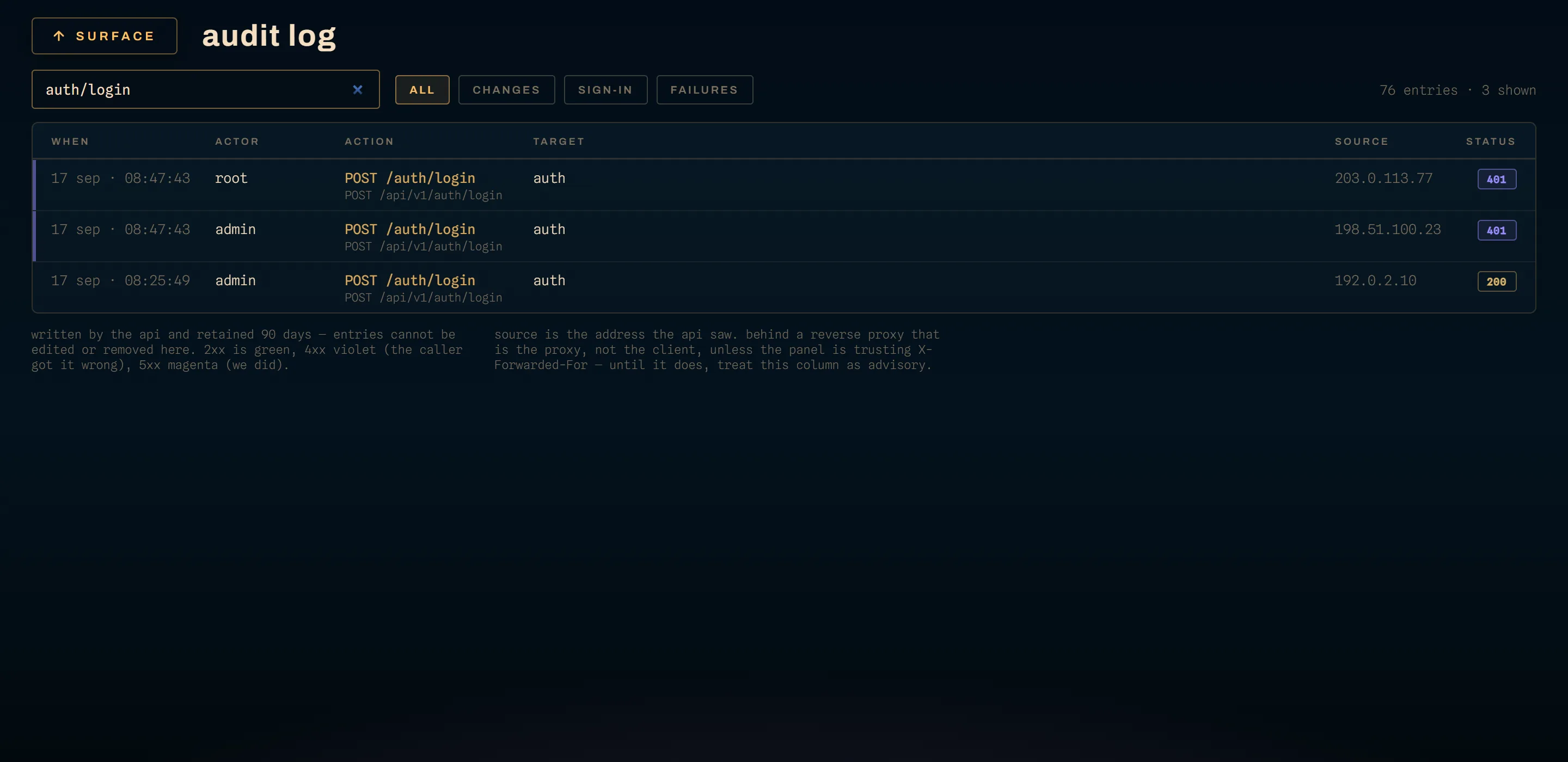
- Audit rows should show real client addresses rather than one repeated proxy address. Nothing else you can look at proves the trusted-proxy setting took.
- Console and stats should stream. When they do not, suspect WebSockets on
the proxy first and
KRAKEN_ALLOWED_ORIGINSsecond. /setup/*should be unreachable from outside your network.KRAKEN_SETUP_ALLOWED_CIDRSgates it on the resolved client address, so a mis-set trusted-proxy list is what would open it. A Panel behind a co-located tunnel otherwise sees127.0.0.1for the entire public internet.- Rate limits should refuse a burst of bad logins from one address without refusing everybody: limits and logging.
While you are here
An internet-reachable Panel wants three more things settled:
KRAKEN_CSPleft atenforce. Runreport-onlyfor a day after putting a new proxy or CDN in front, check the browser console for violations, then switch back.offis for the case where a proxy already sets its own policy: two CSP headers intersect, which is usually stricter than either author intended.KRAKEN_CSP_SCRIPT_SRCset only if your CDN injects a script. The shipped policy is same-origin only. Cloudflare Web Analytics is the common exception and wantshttps://static.cloudflareinsights.comnamed here rather than in the default everyone else inherits.- The game ports left alone. They are not proxied and never were; players connect straight to the node. See ports and firewall.