A server's data directory is a plain host directory, bind-mounted into the
container at /data on Linux and C:\data on Windows. Every file operation and
every backup is native Go against that directory rather than the Docker archive
API, which is why they behave the same on both operating systems and why they
keep working while a node is partial.
Two ways in: the Files tab in the drill-in, and SFTP.
The Files tab
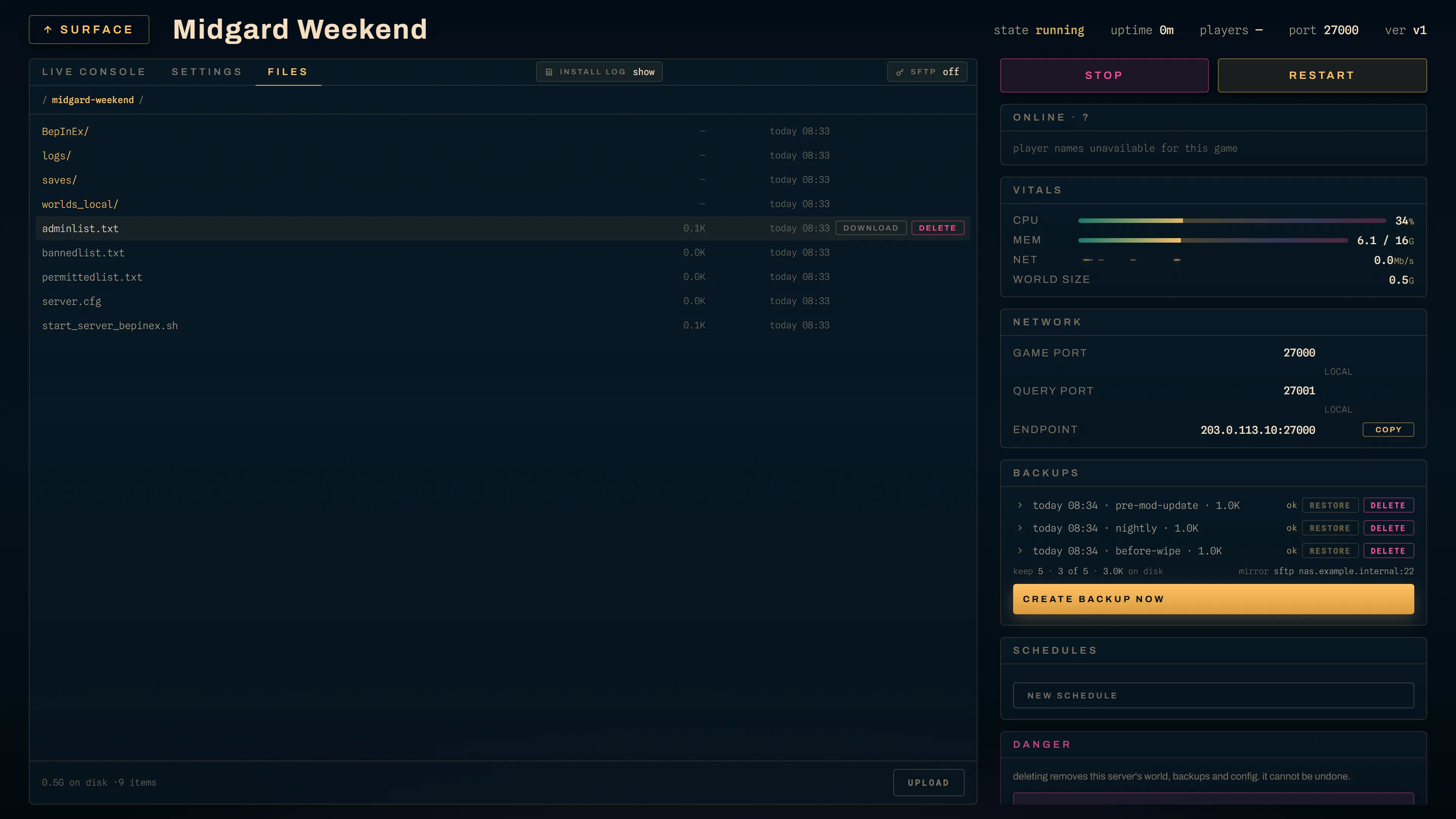
Breadcrumb navigation, one row per entry with its size and modified time, and two per-row actions:
- download on every row. A file downloads as itself; a directory downloads
as a
.zip. It needs onlyserver.files.read, which anyone who can see the tab holds. - delete, shown only with
server.files.write.
Upload is in the footer, also behind server.files.write, and drops into
the directory you are looking at. The Panel caps a single upload request at 64
MiB plus a megabyte of multipart framing, and answers 413 past it. That cap
exists because ParseMultipartForm's argument is only the in-memory threshold:
everything past it spills to temp files, unbounded, so one authenticated request
could otherwise fill the Panel's disk.
There is no in-browser editor today. The API has the read and write routes, with
a 1 MiB ceiling on a read — past it, or for a binary file, the response says
too_large or is_binary and returns no content rather than handing a
megabyte-and-a-half of save data to a text box. For editing a config by hand,
SFTP is the path I would take, and for most settings the Settings tab is the one
you want instead: it renders the game's config files from the spec, so a hand
edit to a templated file is overwritten on the next save.
Downloads
A download used to be a fetch with the session's Bearer header, handing the
bytes to the browser as a Blob. That is the only shape a Bearer-authenticated
client has without a cookie, and it is the wrong one for anything large: the
whole payload sits in tab memory before the save dialog appears, with no
progress, and a multi-GB install tree exhausts the tab.
Since 0.51.0 a download goes through a short-lived token, so a plain anchor can carry the authorization and the browser streams to disk with its own progress UI. What the token is, in SECURITY.md's words:
- "Single-use. The grant is deleted the moment it is looked up — before any validation and long before a byte streams — so a replayed URL finds nothing whether or not the first attempt succeeded."
- "60 seconds. Expiry is checked at redemption, not merely promised at mint."
- "Scoped to one server and one exact path set." The Panel canonicalises the path, pins that spelling into the grant, and rewrites the query from the grant at redemption, "so the token cannot be widened."
- "Bound to the issuing user and session, re-validated at redemption." A revoked role, a deleted account, a server handed to another owner, a logout or an admin-revoked session inside the 60-second window all take effect on the download.
- "Never a Bearer alternative. With
tokenpresent the Authorization header is not consulted at all."
0.52.0 added the announced length. The Agent sets a file's size on the first
chunk from a stat taken before the first byte goes out, and the Panel turns a
non-zero size into Content-Length, "so a truncated transfer is something the
browser can detect rather than something it reports as a finished download".
A zip announces nothing, because an archive's size is not known until it has
been written. Both routes send Accept-Ranges: none: resume is structurally
impossible on a single-use token, and a browser told nothing may offer a resume
that cannot work. Click again is the resume story.
Agents roll out before Panels for this one, though nothing breaks if they do not: an Agent older than the size field sends 0 throughout and the Panel behaves precisely as it did before.
What the audit records
"The audit log records the mint and the redemption with the server, the user and
the path count; the token itself appears in no log line, and a rejected
redemption is a Debug line rather than an audit row, so an unauthenticated
caller with a bad token cannot amplify writes into the audit table."
The redemption row carries "the request's outcome status, not an assumed
200", written from a deferred call on a context that outlives the request, so a
stream that aborts mid-way is on the record rather than missing from it.
Rejected redemptions are counted instead, as
kraken_download_tokens_rejected_total.
Redemption is rate limited at 30 a minute with a burst of 10 per client. The limit sits on the token branch only: an ordinary session-authenticated download is not what it is for, and "an operator must not be refused for sharing a NAT address with somebody probing tokens."
SFTP
Every server gets its own SFTP account on the node that runs it. The Agent
serves it directly on :2022 by default, which is KRAKEN_SFTP_ADDR.
- The username is the server's id. One account per server, not per person.
- Each connection is chrooted to that server's data directory. Client paths
are cleaned against
/and then joined to the root, which is the same containment the Panel's file routes get, and symlink creation is refused, so there is no escaping the jail by making one. - Password or public key. The Panel generates the password, bcrypt-hashes
it, and pushes only the hash to the Agent, which verifies against it. Public
keys are stored in
authorized_keysform and compared by their marshalled bytes. - The plaintext password is shown exactly once, on reset, and is never stored. The Panel keeps only the hash, so that screen is the one time it exists. Copy it then.
- The host key is a persisted ed25519 key, generated on first run, at
KRAKEN_SFTP_HOST_KEYunder the Agent's state directory.
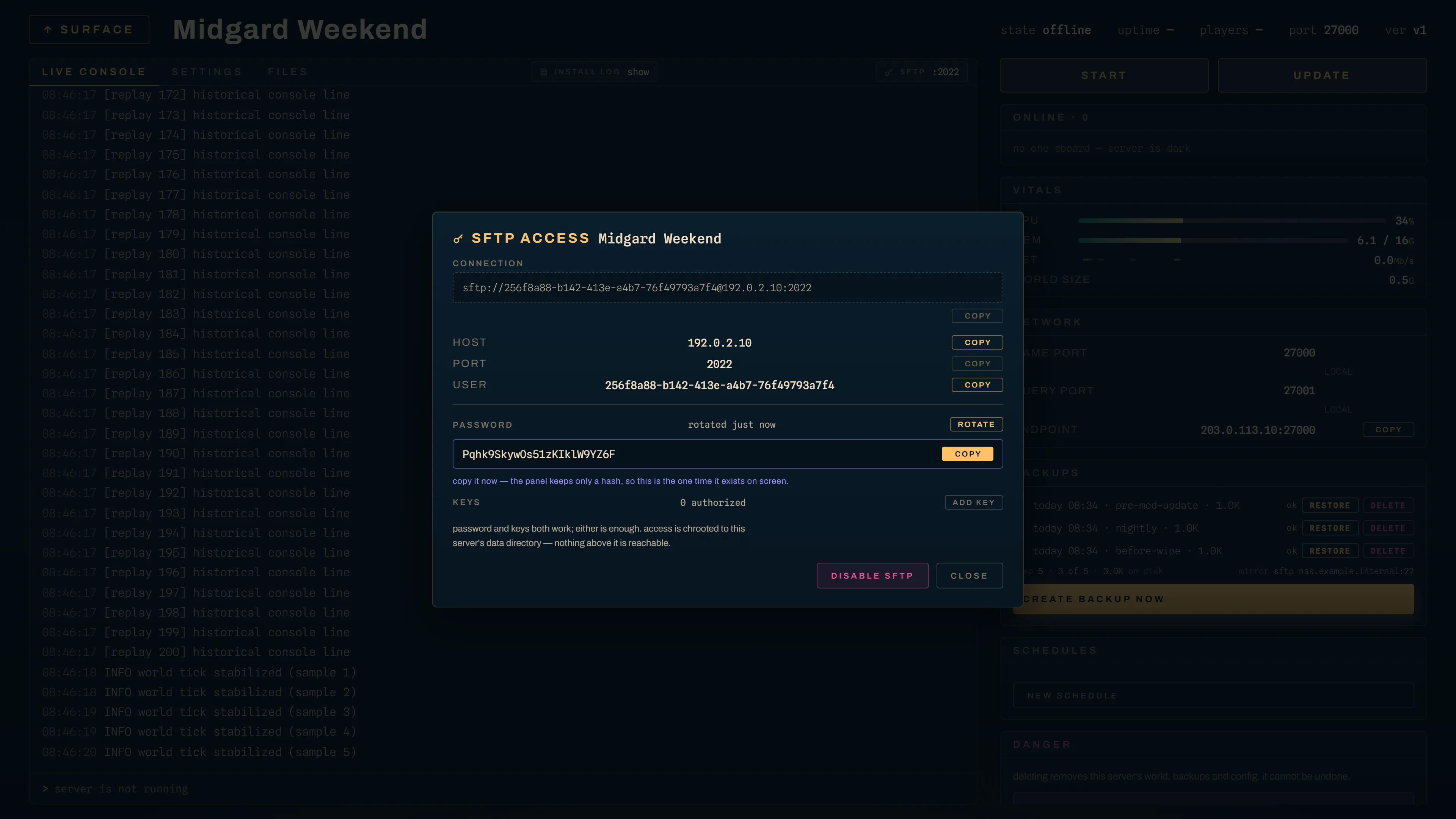
Reading credentials needs server.files.read; resetting the password, setting
keys and disabling access all need server.config.
Tunnel nodes
A tunnel-mode node has no inbound ports at all, so the Panel fronts its SFTP
instead. Each tunnel node gets a Panel-side port of its own, allocated upward
from KRAKEN_SFTP_PROXY_BASE_PORT (default 2222) and persisted on the node
record, and the Panel forwards the raw SSH byte stream to the Agent.
The Panel never terminates SSH, so credentials and host keys stay Agent-side. Each node gets its own port rather than one shared endpoint because raw SSH carries no routing header a pass-through proxy could read. The SFTP card shows the endpoint you should actually connect to, proxied or not, and the in-browser Files tab behaves identically either way.