Releases are cut on GitHub with the binaries attached and their SHA256SUMS
beside them; container images are published to
ghcr.io/briggleman/kraken-panel and ghcr.io/briggleman/kraken-agent in the
same run. The changelog is
CHANGELOG.md.
The order: Panel first, then the Agents from it
Upgrade the Panel, then push each node's Agent from the Panel. There is no other order to choose. The Panel carries the Agent builds of its own release inside its binary, and the update action on the Nodes page is how an Agent moves from one version to the next: the Panel streams the matching build over the mTLS channel it already has, the Agent verifies the checksum, swaps its binary and restarts. An Agent cannot fetch a release on its own.
That order is safe because the protocol is versioned by tolerance rather than
negotiation. A new field arrives in a shape where an older Agent's zero value
means "unknown", and the new Panel falls back to what the old one did.
Tokenised downloads are the worked example: a current Agent announces a file's
size on the first chunk and the Panel turns it into Content-Length; an Agent
older than the field sends 0 throughout and the Panel behaves precisely as it
did before. So a fleet is allowed to sit half-upgraded. Nothing breaks while a
node still runs the previous Agent. You just do not get the new behaviour on
that node until you push it.
The corollary is worth reading twice: the Panel can only push its own version. An Agent it updates lands on the Panel's release and no other, which is why the Panel goes first. Nothing on the Nodes page can offer an update before the Panel itself has one.
Panel: compose
cd /path/to/your/stack
docker compose --env-file deploy/.env -f deploy/docker-compose.full.yml pull panel
docker compose --env-file deploy/.env -f deploy/docker-compose.full.yml up -d
pull then up -d recreates only what changed. Pin a version in deploy/.env
if you would rather decide when:
KRAKEN_PANEL_IMAGE=ghcr.io/briggleman/kraken-panel:v0.52.0Postgres migrations run at startup. Watch them land before you declare victory:
docker compose --env-file deploy/.env -f deploy/docker-compose.full.yml logs -f panelPanel: bare metal
Re-run the installer, then restart:
curl -fsSL https://raw.githubusercontent.com/briggleman/kraken/main/deploy/install.sh \
  | sudo bash -s -- --role panel
sudo systemctl restart kraken-panel
It never touches /etc/kraken/*.env.
Agents: from the Panel
When a node's Agent version drifts behind the Panel's, the Nodes page offers an update action per node. The Panel streams the matching build over the existing mTLS channel; the Agent checksum-verifies it, swaps its binary and restarts.
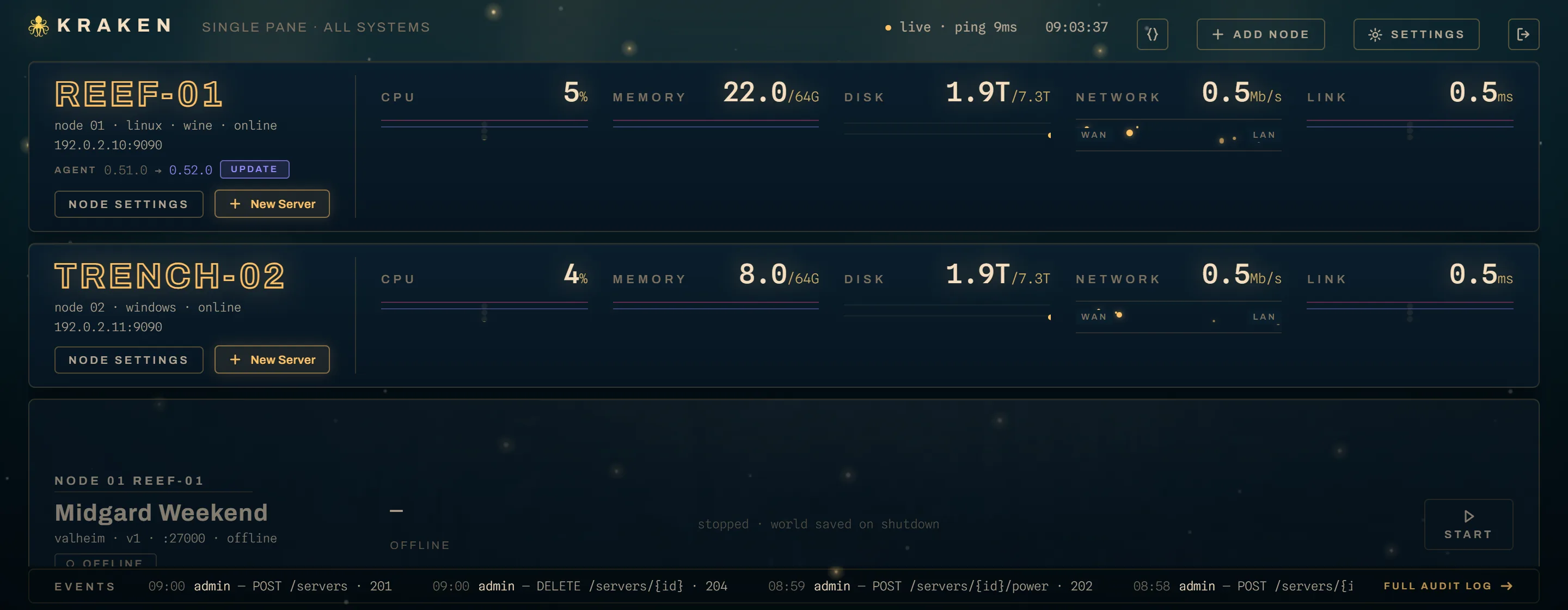
Once the Panel is current, this is the ordinary path. Per node, confirmed per node, and deliberately so: a node going down ends a game session for real people, and I would rather click four times than surprise four servers.
Agents: from their own installer
The installers pull from the GitHub release rather than from the Panel. That is how a new node gets its first Agent, and it is the fallback for a node the Panel cannot push to: an Agent whose self-update rolled back, or one enrolled against a Panel that is not yet running the release you want on it. Re-running the installer over an existing Agent keeps its state directory and its certificate.
# linux
curl -fsSL https://raw.githubusercontent.com/briggleman/kraken/main/deploy/install.sh \
| sudo bash -s -- --role agent# windows, elevated
powershell -ExecutionPolicy Bypass -File $env:TEMP\kraken-install.ps1Both are safe to re-run. Each stops the service, swaps the binary, starts it again, and leaves your configuration alone. The Windows installer also re-asserts the service's recovery configuration on every run, which is worth more than it sounds: otherwise a service registered by an old installer carries its old recovery policy through upgrade after upgrade.
What self-update actually does
The update is transactional, and the design exists so that a binary which cannot start does not take the node down with it.
- The incoming binary is checksum-verified before anything is touched.
- A sentinel,
update.jsonin the Agent's state directory, records the attempt, from-version and to-version. - The running binary is set aside beside the new one as
<exe>.old. The swap is a rename, never an overwrite: the running file's inode survives. - The Agent restarts. Each boot increments the sentinel's attempt counter,
and past three attempts the Agent swaps
.oldback, sets the failed binary aside as<exe>.failed, and records the failure. The service manager's restart-on-failure loop is the retry engine; the sentinel is what bounds it. - The sentinel and
.oldare cleared by a health milestone: the firstGetNodeInfoserved to the Panel, or two minutes of clean uptime if the Panel is itself briefly down during a fleet update.
A failed-and-reverted update is reported back to the Panel and shown on the node until a later update succeeds. So when a node comes back on its old version, read it plainly: the new binary did not start, three times, and the Agent put the old one back.
When a node does not come back
Read the log first.
# linux
journalctl -u kraken-agent -n 100
sudo systemctl start kraken-agent# windows
Get-Content C:\kraken\state\agent.log -Tail 50
Get-Content C:\kraken\state\restart-helper.log -Tail 50
Start-Service kraken-agentagent.log is the Agent itself (JSON, rotated at 10 MiB).
restart-helper.log is the Windows-only relaunch after a self-update: the
swapped binary starts a hidden --service restart-helper process, which waits
for the service to stop, starts it through the SCM API, confirms it is running,
and logs every step. If a Windows node does not come back after an update,
that file says which step it got to. Start-Service kraken-agent brings it up
meanwhile.
The service's recovery actions are what restart a failing Agent: a bad config, a bind conflict, and above all the boot-attempt loop described above. Check and heal them:
C:\kraken\bin\kraken-agent.exe --service status
C:\kraken\bin\kraken-agent.exe --service install --root C:\kraken
C:\kraken\bin\kraken-agent.exe --service status
--service status exits 0 when the registered configuration matches what
--service install would write, 1 on drift, and 2 when the service is not
installed or the SCM cannot be read. An unelevated shell lands on 2. It prints
actual against expected per field, so it is scriptable, and it is the first
thing I run when a Windows node's behaviour across updates stops matching the
docs.
Rolling back
Downgrading has no button, and a rollback is not free, since migrations run forward. The realistic recoveries:
- Agent: pin the previous release and re-run the installer with
--version vX.Y.Z(Linux) or-Version vX.Y.Z(Windows). - Panel: set
KRAKEN_PANEL_IMAGEto the previous tag andup -d. Whether that works turns on whether the release migrated the schema, so check the changelog entry before assuming it does. - Everything: restore the
pgdatavolume and the Panel's state directory together. Neither is a restore on its own, and neither is a restore withoutKRAKEN_SECRETS_KEY.