One Agent per machine. It talks to that host's Docker daemon, owns the server files on disk, takes the backups and serves SFTP. Bare metal is the main line on both operating systems, for the unglamorous reason that the Agent wants the host's Docker socket and the game ports have to land on the host regardless.
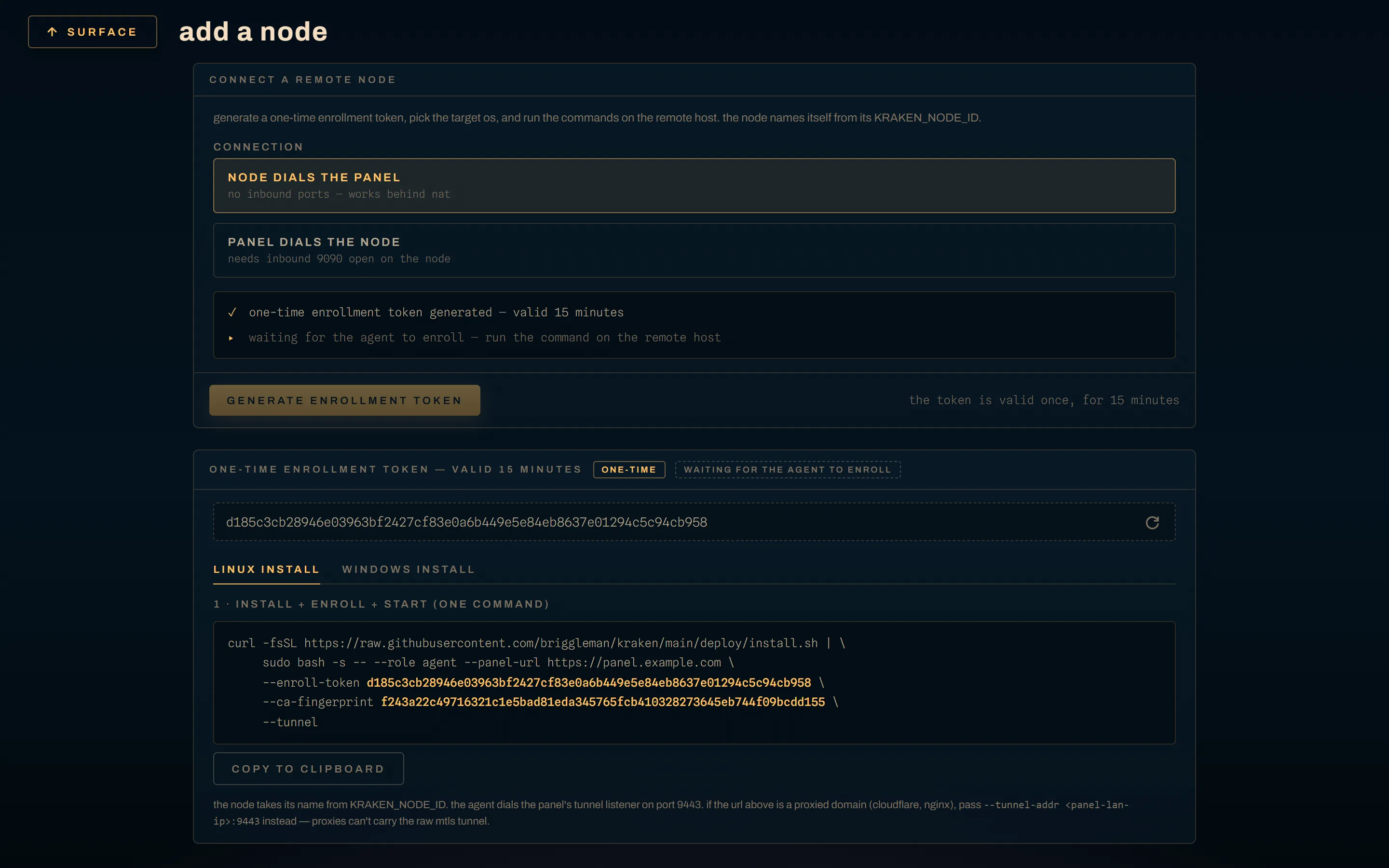
Have the Panel open before you start. Everything here ends at Settings → Nodes → Add node, which mints the one-time token the Agent enrolls with.
Linux
curl -fsSL https://raw.githubusercontent.com/briggleman/kraken/main/deploy/install.sh \
  | sudo bash -s -- --role agent --tunnel \
      --panel-url http://<panel-host>:8080 \
      --enroll-token <one-time-token> \
      --ca-fingerprint <sha256-from-the-dialog>
The Add node dialog renders that command with the real values already in it. Copy it from there rather than typing it.
| flag | what it does |
|---|---|
--role agent |
installs the Agent and krakenctl, not the Panel |
--panel-url |
the Panel the token was minted on. Enrollment is an outbound HTTP call to this URL |
--enroll-token |
the one-time bootstrap token. Single use, and a Panel restart invalidates it |
--ca-fingerprint |
pins the Panel's CA. Without it the Agent trusts whatever CA the enrollment answer carries, and the installer warns you about that |
--tunnel |
reverse-connection mode: the Agent dials the Panel, so this host needs no inbound rule at all |
--tunnel-addr |
the tunnel endpoint, when it is not <panel-url host>:9443 — which it is not when the Panel URL is a proxied domain |
--version vX.Y.Z |
pin a release instead of resolving the latest |
--no-systemd |
binaries and config only |
The installer downloads the release binaries, verifies their SHA-256
checksums, creates the kraken system user, adds it to the docker group,
creates /var/lib/kraken plus /etc/kraken, writes /etc/kraken/agent.env,
installs the unit, and, when you passed a token, starts the service so the
Agent enrolls on first start.
journalctl -u kraken-agent -fRe-running it is safe. It upgrades the binaries and rewrites only the enrollment keys, which is also the recovery path for an expired token.
the unit, and /opt/kraken/bin
deploy/systemd/kraken-agent.service
runs as kraken with SupplementaryGroups=docker, under the same hardening the
Panel unit takes. Two details are load-bearing:
ExecStart=/opt/kraken/bin/kraken-agent, not/usr/local/bin. The Panel can push a new Agent build, and the Agent replaces its own binary in place: it writeskraken-agent.newbeside itself and renames the running file to.old, which needs write permission on the directory./usr/local/binis root-owned and, underProtectSystem=strict, read-only as well./opt/kraken/binis kraken-owned and holds one replaceable file./usr/local/bin/kraken-agentstays as a symlink so the command is still onPATH.ReadWritePaths=/var/lib/kraken /etc/kraken /opt/kraken/bin. MoveKRAKEN_DATA_DIRorKRAKEN_BACKUP_DIRoutside/var/lib/krakenand you have to add them here withsystemctl edit kraken-agent, or the write fails at runtime.
enroll after the fact
Installed without a token, or the token expired? Mint a fresh one, then either re-run the installer with it or enroll by hand:
sudo krakenctl enroll -panel http://<panel-host>:8080 -token <one-time-token>
sudo systemctl restart kraken-agent
Windows
For Windows-native game servers. The Panel and its Postgres stay on a Linux host; the Windows machine runs the Agent as a native service. Docker Desktop has to be in Windows containers mode. It cannot serve Linux and Windows containers at once, so that choice is per host.
In an elevated PowerShell:
iwr -useb https://raw.githubusercontent.com/briggleman/kraken/main/deploy/windows/install.ps1 -OutFile $env:TEMP\kraken-install.ps1
powershell -ExecutionPolicy Bypass -File $env:TEMP\kraken-install.ps1 `
  -PanelUrl http://<panel-host>:8080 `
  -Token <one-time-token> `
  -CaFingerprint <sha256-from-the-dialog> `
  -Tunnel
The Add node dialog's Windows tab renders this with the values filled in.
| switch | what it does |
|---|---|
-PanelUrl -Token -CaFingerprint |
the same three enrollment values as Linux |
-Tunnel |
reverse-connection mode. Also skips the firewall rule, because nothing dials in |
-TunnelAddr |
the tunnel endpoint when it is not <PanelUrl host>:9443 |
-Root |
everything lives beneath it. Default C:\kraken |
-Version |
pin a release |
-NoFirewall / -NoService |
skip those steps |
One run downloads and checksum-verifies the binaries into C:\kraken\bin,
writes C:\kraken\agent.yaml (node_id is the computer name, lowercased;
node_os: windows), opens a port-based firewall rule for TCP 9090 + 2022
unless -Tunnel was passed, registers the kraken-agent service with delayed
auto-start and restart-on-failure recovery actions, starts it, and then waits up
to 60 seconds for the log to say serving with mutual TLS.
State lives in C:\kraken\state: the mTLS bundle, the SFTP host key, and
agent.log (JSON, rotated at 10 MiB).
Get-Content C:\kraken\state\agent.log -Tail 30 -Wait
C:\kraken\bin\kraken-agent.exe --root C:\kraken --print-config
--print-config prints the configuration the Agent resolved, without starting
it. Fastest answer to "which of the three spellings won".
That firewall rule is port-based on purpose. A program-based rule quietly stops matching when the binary is renamed or replaced, and a self-update does both.
Docker
An Agent can run as a container, from
deploy/agent.Dockerfile
as image ghcr.io/briggleman/kraken-agent, and the compose stack's third
service does that. It wants network_mode: host and /var/run/docker.sock,
because it launches game containers on the host's daemon and their ports have to
be reachable from the LAN.
agent: image: ghcr.io/briggleman/kraken-agent:latest network_mode: host environment: KRAKEN_AGENT_ADDR: 127.0.0.1:9090 KRAKEN_DATA_DIR: /var/lib/kraken/server-data KRAKEN_STATE_DIR: /var/lib/kraken KRAKEN_PANEL_URL: http://127.0.0.1:8080 volumes: - /var/run/docker.sock:/var/run/docker.sock - /var/lib/kraken/server-data:/var/lib/kraken/server-data - agent-state:/var/lib/kraken
Handing a container the Docker socket gives it the host's daemon. A bare-metal
Agent holds the same authority, which is why the Agent's gRPC in this stack
binds 127.0.0.1:9090: Agent gRPC has no application-level auth, mTLS is the
whole trust boundary, and a plaintext listener on a LAN address hands the socket
to any peer that can reach it. The Agent refuses to serve plaintext gRPC on a
non-loopback address unless KRAKEN_ALLOW_INSECURE_GRPC=1 says so out loud.
Windows nodes cannot take this path. Compose's host networking is Linux-only, and Windows-container game servers need the host's Windows daemon.
Enrolling the node
Enrollment is how an Agent gets the mTLS bundle it serves with: one outbound HTTP call from the Agent to the Panel, answered with a signed certificate.
- Settings → Nodes → Add node in the Panel.
- Mint a one-time enrollment token. Single-use, expires in about 15 minutes, and a Panel restart invalidates it. An expired token costs you nothing: mint another and re-run the installer.
- Copy the CA fingerprint shown beside it. The Agent refuses any CA whose SHA-256 does not match, which is what stops something else answering the enrollment call.
- Choose tunnel or direct. Tunnel is the default for new nodes.
- Run the install command on the host. The Agent generates a key, exchanges the token for a certificate, persists the bundle, reports its addresses so the dialog can prefill itself, and starts serving.
- Confirm the address in the dialog and register the node.
The bundle lands in the Agent's state directory: agent.pem, agent-key.pem
and ca.pem under /var/lib/kraken on Linux or C:\kraken\state on Windows.
(krakenctl enroll -out <root>/certs writes the same three files to
<root>/certs, which the Agent adopts on its own once all three exist.) That
bundle is the node's identity. It survives restarts, it is what the Panel
authenticates, and the Panel rotates it as expiry approaches. Delete it and the
node needs a fresh token.
tunnel or direct
Tunnel: the Agent holds one outbound mTLS connection to the Panel's :9443
listener and everything rides it — deploys, console, stats, file operations,
backups, self-update. No inbound firewall rules, and it works behind NAT you do
not control. The Panel fronts each tunnel node's SFTP on a per-node port of its
own, allocated upward from KRAKEN_SFTP_PROXY_BASE_PORT (default 2222),
forwarding the raw SSH stream to the node, so the Panel never terminates SSH and
the host key stays on the Agent.
Direct: the Panel dials the node on :9090. Fewer moving parts, and on a
LAN you own that is a real argument for it. The node has to accept inbound TCP
9090, plus 2022 for SFTP. Enrollment succeeding proves nothing about that, since
enrollment is outbound; a freshly enrolled node sitting offline is usually a
blocked inbound port. See ports and firewall.
Which to pick? Tunnel unless you have a reason. It is the default because the inbound rule is where most installs come apart, and a node you cannot reach is worse than a hop you cannot see.
Give the node a port range
A newly registered node has no game-port pool until you give it one. The
reference range is 28000–28999.
Game ports are published 1:1: the port the Panel assigns is the port on the host and the port players connect to. Forward them on your router, and keep the pools non-overlapping where two Agents share a port space.