A backup is the game's save data, not the reinstallable install tree. That
sentence is the whole design. A 10 to 30 GB SteamCMD tree comes back with a
reinstall; the world does not. Archiving the whole data directory is what
produced multi-hour backups, mirror bandwidth nobody wanted, and archive/tar: write too long failures when a live log grew inside the tree mid-capture.
What gets captured
The spec's optional backup: block decides, with
doublestar globs matched against
data-directory-relative POSIX paths. include selects, exclude then filters,
and an exclude wins a conflict.
backup: include: - Pal/Saved/** exclude: - Pal/Saved/Logs/**
A spec with no block gets the Panel's built-in policy instead: the whole data directory minus a conservative, ephemeral-only exclude list — SteamCMD staging directories, logs, crash dumps. That is the safe default and the right one when you are unsure, because capturing too much is only slow, while an include list that misses the saves produces a green backup with no save in it.
Declaring the block replaces that policy wholesale. The built-in excludes are
not merged underneath it. A save tree that carries logs, which every Unreal game
has, needs its own Logs/** exclude in your block.
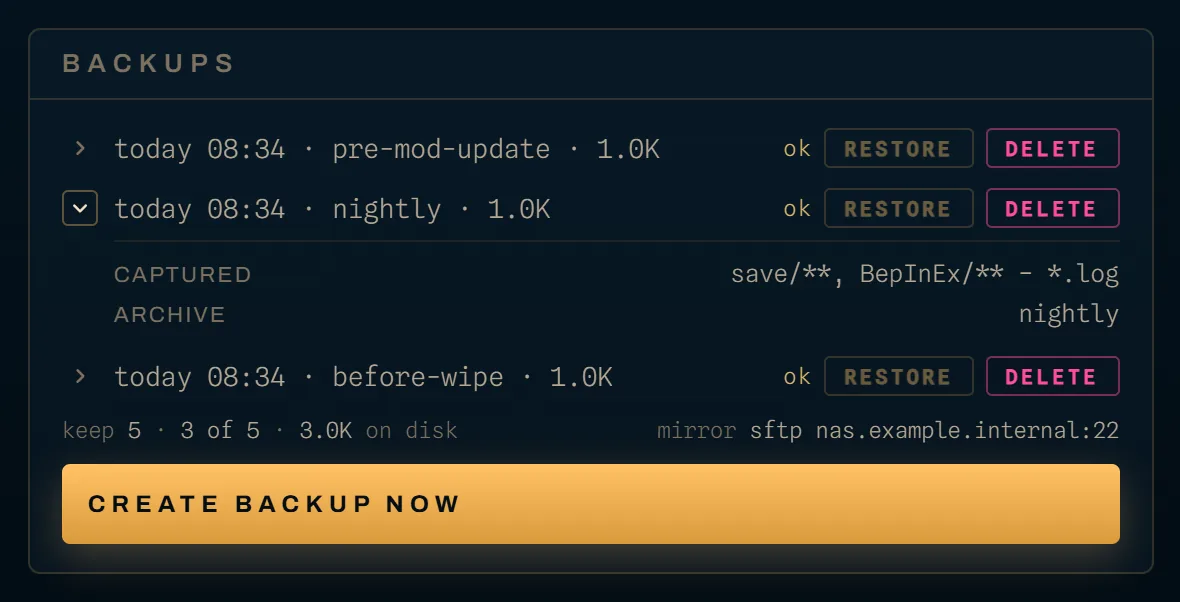
The drill-in shows what a given server's globs resolve to, as a captured line
on each expanded backup row, so you can check before you need the archive rather
than after.
Where it goes
A node's backup destination is set per node, in its config, and every server on that node uses it. Four kinds:
| target | what it is |
|---|---|
local |
a directory on the node's own filesystem. The default. |
share |
a network share already mounted on the host. The directory has to point at the mount. |
sftp |
an SFTP server the Agent dials itself. |
smb |
an SMB server the Agent dials itself, with credentials, no host mount. |
The distinction between share and smb is worth a moment. share delegates
the mount to the host, which means it inherits whatever the host's credentials
and automount are doing, and on Windows it inherits the fact that a service
account does not see a mapped drive. smb dials the server from inside the
Agent with credentials it holds, which is why it works from a service account on
either OS. When in doubt on Windows, I would use smb.
Destination paths take one token, {{SLUG}}, which expands to the server's
game-spec slug and is sanitised to a single safe path segment. It is stable for
the life of a server, so the resolved path is the same across capture, list,
restore and delete. Use it: a share or smb directory holds archives directly
rather than under a per-server subdirectory, so without {{SLUG}} two games end
up in one folder.
An SFTP target dials port 22 unless the host carries one, prefers a private key over a password when both are set, and pins the remote host key when you give it one. Without a pinned key it trusts on first use and logs a warning, which is fine on a LAN and not what I would run over the internet.
Mirroring off the node
replicate_to_sftp or replicate_to_smb sends a second copy off the node after
each successful capture. The two are mutually exclusive. Mirror state is
tracked per archive and shown on its row: mirroring, mirrored, or mirror failed. A row that says ok is one on a node with no replication configured,
not one that failed to mirror.
An archive is a .tar.gz. Its id is the capture time in milliseconds, then a
double underscore, then the name you gave it with anything outside
[A-Za-z0-9._-] replaced, and the file on disk is that id plus .tar.gz. It is
an ordinary tarball: you can open one without Kraken, which is the point of the
format.
Schedules
Cron, per server, with five fields in the usual order: minute, hour, day of month, month, day of week. Four actions:
| action | what it does |
|---|---|
restart |
restarts the server. Drives the Agent directly, so it does not re-run the install pass. It runs on a server that is running, starting or crashed, so it still revives a server the watchdog gave up on, and is skipped on offline (someone stopped it, and a restart would start it again), stopping, installing and install_failed. It is also refused while a required setting is empty. A skip is recorded as the schedule's last error, shown on its row. |
backup |
takes a backup. |
command |
sends a console command. |
replicate |
mirrors existing archives off the node. |
The UI offers four presets, and they are what the field is filled with:
| preset | cron |
|---|---|
| hourly | 0 * * * * |
| every 6h | 0 */6 * * * |
| daily 04:00 | 0 4 * * * |
| sun 04:00 | 0 4 * * 0 |
A scheduled backup runs under a ten-minute ceiling and a replicate under thirty. A capture that needs longer than that is a sign the globs are capturing the install tree.
Retention: five, and it is not a setting
The Agent keeps the five most recent archives per server and prunes after every successful capture. Eviction removes the archive from the node and from its mirror, so the off-node copy does not quietly become an unbounded archive of everything you ever took.
Failed captures do not hold a slot: retention counts what is actually on disk.
There is no per-server or per-node knob for this today, and the UI states the
number rather than hiding it. The backups footer reads keep 5 · n of 5 · <size> on disk, and at capacity it names the archive the next backup will remove,
before you take it. If you want more history than five, mirror to a target you
control and let your own tooling keep what it wants; the mirror copy is a
.tar.gz like any other.
Restoring
Stop the server first. The Panel refuses a restore unless the server is
already in offline, crashed or install_failed, and answers 409 naming
the current state otherwise. It will not stop a running game on your behalf.
A restore runs in the background. The request answers at once and the
server moves to restoring, where it stays until the restore ends. The server
record carries a restore block while it runs: the archive, the state the
server came from, when it began, and the live phase and byte counts.
While it is restoring, everything that writes the server's files is
refused with a 409 carrying code: server_restoring: start and restart,
reinstall, deleting the server, saving its settings (a settings save pushes
config files into the tree), creating or deleting a backup, and every file
write, upload, move, copy, new folder and delete. Reading and downloading files
still work. A second restore is refused with restore_in_progress. Scheduled
restarts, backups, commands and replication are skipped, with the reason in the
schedule's last error. The reconciler leaves the row alone, and stop and kill
still reach the node.
The other direction holds too. A start or restart holds the server until the
Agent has answered its power call and the row is written; a reinstall, and a
start that runs the update pass first, hold it only until installing is
written, after which that state keeps a restore out by itself. A restore asked
for while one of them holds the server is refused with server_busy — the row
can still read offline while a start is booting the game. Below the Panel, the Agent refuses to restore while the server's container
is running, restarting or paused, while an install pass for the server is
running on the node (the same refusal a start gets there), and when it cannot
check the container at all — in each case nothing in the tree is touched.
The backups ledger draws the restore's progress as the compressed bytes read from the archive against its size. An Agent older than 0.56 cannot report progress, and the meter then shows the restore as running without a figure.
When the restore ends the server goes back to the state it came from:
offline, crashed, or install_failed — a restore puts saves back, it does
not repair an install, so an install_failed server keeps its reinstall gate
and its install's last_error. The outcome goes to restore_result
(ok, the Agent's error, finished_at), never to last_error; a failed
restore's reason says whether the files were rolled back.
The restore is staged rather than streamed into place: the archive is extracted into a scratch directory inside the server's own data directory, and only then are the covered paths renamed into place, with the previous versions set aside so a failure part-way can be rolled back. Paths the archive does not cover are left alone.
The extractor is hardened on every axis a tar archive offers. Backslashes,
absolute paths, volume-qualified names and any literal .. segment are
rejected, the joined destination is prefix-checked against the staging directory
and again against the server's own host directory, and symlink and hardlink
entries are skipped rather than materialised. A restore that skipped entries
logs what it skipped.
Restore has a two-hour ceiling of its own. A Panel restart mid-restore
loses the job, and the reconciler returns the server to the state its record
says it came from — so an install_failed server stays behind its reinstall
gate — with a restore_result saying the outcome is unknown. What happened on
the node depends on the Agent: one that kept running saw its connection cut and
rolled the files back, but one that crashed or restarted part-way through the
swap did not, and the displaced originals are then left beside the tree as
*.kraken-aside-* directories. Check the server's files before starting it. An archive only ever contains what
was included, so a restore cannot bring back a file the globs never captured,
which is the other reason to check that captured line early.
Retired servers keep their archives
Retiring a server (Servers) takes a
final backup, named final-before-retire, and then removes the world — but it
never touches an archive. They stay where the node's target keeps them, keyed by
the server's id, and the retired server's backup list still answers from the
node it left. Retention does not run for a retired server, because nothing
captures for it, so its last five archives stay.
A revive can restore any of them after its install: the archive has to be on the node the server is revived onto, which by default is the node it left.
Deleting a retired server permanently deletes its archives only where they
are provably its own: the zero-config node-local layout, where each server's
archives live in <backup_dir>/<server id>/. A configured backup directory, a
share, SFTP and SMB — and the mirror, which is always one of those — keep every
server's archives side by side, and a file called
1726000000000__nightly.tar.gz does not say whose it is. On those targets the
archives are kept, and the delete's answer says which location kept them.
If you use a shared target and want a deleted server's archives gone, delete
them there by hand; {{SLUG}} in the path at least keeps each game's archives
in a folder of its own.